
Tutorial: zero → wallet-authed dApp
Build a Rails app where users sign in with a Solana wallet — and understand every moving part along the way. From `rails new` to a working SIWS flow, explained.
You can get a wallet-authenticated Rails app running in ten minutes with the Quickstart. This tutorial takes the same road slower: at every step you’ll see what just happened, why it’s there, and how to tell it worked — so when you customize it later, nothing is magic.
Who this is for: Rails developers who have never touched Solana. No Rust, no prior wallet knowledge. I’ve spent 20 years building login and payment flows in Rails — password resets, session hijack paranoia, 3DS challenges, all of it. Wallet auth is the first time in those 20 years that authentication got simpler instead of growing another layer. This tutorial shows why.
What you’ll have at the end: a Rails 8 app where a user clicks “Connect Wallet”, signs a message with Phantom, and gets a session — no passwords, no emails, no OAuth provider.
The mental model: what is Sign In With Solana?
Before any code — SIWS in one paragraph:
- Your server generates a one-time nonce (a challenge).
- The wallet signs a human-readable message containing that nonce, your domain, and the wallet address (Ed25519 signature).
- Your server verifies the signature against the public key — which is the wallet address.
- Valid signature → create the session. The wallet is the identity.
Coming from Rails: replace has_secure_password + email confirmation with “prove you hold the private key”. There is nothing to reset, leak, or re-hash.
If you’ve ever implemented 3DS, the shape is familiar: a challenge goes out, the holder proves control, the merchant never touches credentials. SIWS is that flow minus the bank — your app issues the challenge, the wallet proves key control, and there’s no third party in the loop at all.
1. Create the app
rails new my_solana_app --css=tailwind --javascript=esbuild
cd my_solana_app
Why esbuild and not importmaps: the wallet-side code (@solrengine/wallet-utils, @solana/kit) ships as npm packages that need bundling.
2. Add SolRengine
# Gemfile
gem "solrengine"
gem "dotenv-rails", group: [:development, :test]
The solrengine meta-gem pulls the family: rpc (JSON-RPC client), auth (SIWS engine), tokens, transactions, realtime, programs, ui. For this tutorial only auth and rpc do the work — the rest wait quietly until you need them.
3. Run the installer
bundle install
rails generate solrengine:install
rails db:prepare
yarn add @solrengine/wallet-utils @solana/kit @wallet-standard/app @solana/wallet-standard-features @rails/actioncable
What the generator just wired (this is the step where quickstarts feel magic — here’s the inventory):
- A
Usermodel whose identity column iswallet_address— nopassword_digest, no reset-token columns, noconfirmed_at. Twenty years of users-table baggage, replaced by one indexed string - The auth engine mounted at
/auth→ four routes: login page, nonce challenge, verify, logout - A wallet Stimulus controller (connect button ↔ Wallet Standard discovery)
- Multi-database SQLite (primary/cache/queue/cable) + Solid Queue/Cache/Cable
.envtemplate,Procfile.deventries
Checkpoint: bin/rails routes | grep auth shows the engine and its four routes:
solrengine_auth        /auth              Solrengine::Auth::Engine
  login GET    /login(.:format)   solrengine/auth/sessions#new
  nonce GET    /nonce(.:format)   solrengine/auth/sessions#nonce
 verify POST   /verify(.:format)  solrengine/auth/sessions#create
 logout DELETE /logout(.:format)  solrengine/auth/sessions#destroy
4. Point it at devnet
# .env
SOLANA_NETWORK=devnet
SOLANA_RPC_URL=https://devnet.helius-rpc.com/?api-key=YOUR_KEY
SOLANA_WS_URL=wss://devnet.helius-rpc.com/?api-key=YOUR_KEY
APP_DOMAIN=localhost
Why APP_DOMAIN matters: the domain is inside the signed message. A signature captured on evil.com can’t be replayed against your app — the domains won’t match. Payments people will recognize this instantly: it’s origin binding, the same reason a 3DS authentication result can’t be replayed by a different merchant. The domain lives inside what’s signed, so the proof only works where it was minted.
Why devnet: free, instant, and Phantom switches networks in Settings → Developer.
5. Boot it — with bin/dev, not rails server
bin/dev
Gotcha (you will hit this): running plain
bin/rails serveron a fresh clone 500s withPropshaft::MissingAssetError: application.js. The JS and CSS bundles don’t exist until esbuild/tailwind run —bin/devstarts those watchers alongside Puma. If you see that error, you skippedbin/dev.
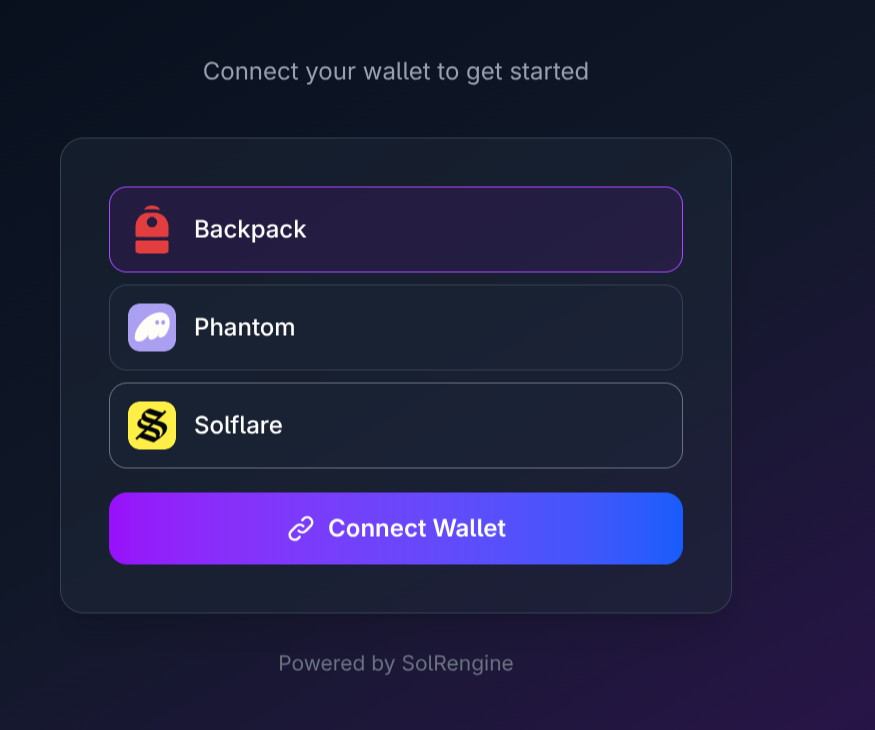
Checkpoint: localhost:3000/auth/login renders the wallet picker — every Wallet Standard wallet installed in your browser shows up, discovered automatically:
6. Sign in, and watch what actually happens
Open the browser devtools Network tab, click Connect Wallet, and follow along:
GET /auth/nonce?wallet_address=...→ the server mints a challenge (rate-limited per wallet, backed by Solid Cache) and returns the full sign-in message- Phantom pops that message, human-readable — actually read it once:
   localhost wants you to sign in with your Solana account:
   Hij9...6cXM

   Sign in to localhost

   URI: http://localhost:3000
   Version: 1
   Chain ID: devnet
   Nonce: 35c7c8a1e8a75e57cff7d9288a85eb61
   Issued At: 2026-07-09T02:24:47Z
Your domain, the chain, a one-time nonce, a timestamp — everything the signature will bind together.
3. POST /auth/verify with the signature → pure-Ruby Ed25519 verification (no Node sidecar, no external service) → the User row is created on first sign-in
4. Session created → redirect to / (your root route — which is why step 7 points it at the dashboard)
This was the aha for me: the entire authentication ceremony is four requests you can read top to bottom in your dev log. I’ve debugged OAuth flows across three redirect hops, two provider dashboards, and a state param that vanished somewhere in between. This one fits on a single screen — and every byte of it is inspectable.
7. Make a page that needs auth
# config/routes.rb
root "dashboard#show"
# app/controllers/dashboard_controller.rb
class DashboardController < ApplicationController
  before_action :authenticate!

  def show
    @wallet  = current_user.wallet_address
    @balance = Solrengine::Rpc.client.get_balance(@wallet)  # => SOL, e.g. 0.5806
  end
end
current_user, logged_in?, authenticate! — the helpers you’d expect, added to ApplicationController by the generator. The balance is one RPC call — no SDK ceremony.
And the view — don’t skip this, Rails won’t invent it for you (ask me how I know):
<%# app/views/dashboard/show.html.erb %>
<div class="max-w-xl mx-auto py-16 px-4">
  <h1 class="text-2xl font-bold">gm 👋</h1>
  <p class="mt-2 font-mono text-sm"><%= @wallet %></p>
  <p class="mt-4"><%= @balance %> SOL</p>
  <%= button_to "Log out", solrengine_auth.logout_path, method: :delete, class: "mt-6 underline" %>
</div>
Checkpoint: visiting / logged-out redirects to /auth/login; logged-in shows your devnet address and balance.
Troubleshooting
| Symptom | Cause → fix |
|---|---|
500: application.js not found |
Started rails server instead of bin/dev (assets never built) |
| Connect button does nothing | No Wallet Standard wallet installed / Phantom still on mainnet |
422 on /auth/nonce |
Missing or invalid wallet_address param — the nonce is minted per wallet (also check the per-wallet rate limit if you’re hammering it in tests) |
| Signature verify fails locally | APP_DOMAIN doesn’t match the host you’re browsing on |
Where to go next
- Skip all of the above next time: the starter is this tutorial already assembled, plus a token portfolio, Send SOL flow, and 20+ UI components.
- Tokens · Transactions · Realtime · Programs
From rails new to signing in with a real wallet took me about ten minutes — I timed it while testing this tutorial. The equivalent in the JS framework of the week is a weekend of provider wrappers and adapter configs. That gap is the reason SolRengine exists: Rails productivity, Solana speed.